Tuesday, November 10, 2009


Posted: 08 Nov 2009 04:55 AM PST
[tweetmeme]
I`m sure you have already tried to upgrade your Zune HD with the 4.3 firmware, and I`m also sure that some of you succeed and someone don`t. For those who didn`t manage to install the new software, I will give you some tips:
1. First you should disconnect your phone from your computer and close the Zune software.
2. Then you to have to press and hold the POWER and MEDIA (side media control) buttons until your device require you to connect to your computer (Please connect to computer).
3.Then reconnect your device and open the Zune software.
4. When the program starts go up to the top to Settings, go over the left to Device and go to Player Update
5. After that you will get a message saying :“Your player is up to date” with version 4.1 or that it needs an update to version 4.3
6. If it does say you are up to date with version 4.1 you have to :
a. Go to start
b. Control Panel
c. Open up your settings and time for region
d. Then go to Change the country or region and change your country from USA to Canada
e. And finally hit Apply and then hit Ok.
7. This is it.
It`s a very simple procedure and it shouldn`t erase any content, but after the installation your sync relationship will be lost so you have to go in to “Device settings” and put that back on.
I hope you won`t have any problems, but I assure you that it worked at my device. Once again, make sure that everything’s alright before you start the procedure.
Zune HD
Zune HD

10 must-have downloads for Windows 7

Improve Microsoft's new OS with these downloads

Jeff Bertolucci
Windows 7 is faster and more efficient than its predecessor Vista. However, that doesn't mean it can't be improved upon further. We've compiled a list of 10 valuable software tools - many of them free - that can make your Win 7 experience a lot more rewarding.

There's no doubt that Microsoft new OS, Windows 7, is faster and more efficient than its predecessor Vista.
However, that doesn't mean it can't be improved upon further.
We've compiled a list of 10 valuable software tools - many of them free - that can make your Win 7 experience a lot more rewarding.

Microsoft Security Essentials

Like its predecessors, Windows 7 doesn't provide built-in protection against malware such as viruses and spyware. (It does have a firewall, however.)
You could pay McAfee or Symantec for this service, but why bother when Redmond's service does the same thing for free?
Microsoft Security Essentials provides solid protection for home PCs, and it's gratis. If you prefer third-party security, check out AVG Anti-Virus Free Edition instead.

Ninite

Brave souls upgrading to Windows 7 from XP must do a clean install, a tedious process that includes, among other things, reinstalling all apps.
Instead, why not load most of your free and open-source programs all at once? Ninite does just that. First, go to the Ninite site and pick the programs you want (for instance, Firefox, iTunes, and Skype).
Next, download Ninite, which installs the apps on your PC without introducing additional crapware. Ninite is free for personal use.

Windows Live Photo Gallery

To keep Windows 7 slim and trim - and to avoid the code bloat that slowed Vista - Microsoft left a few utilities out of its new operating system.
One such app, Photo Gallery, is a free, easy-to-use photo manager/editor that's worth a download, particularly if you aren't already using Google Picasa to organise your pics and videos.

Windows Easy Transfer

If you are moving to Windows 7 from XP or Vista, you should check out this free download, which helps you copy files and settings from one PC to another. (Windows 7 comes with Easy Transfer.)
The new version of Easy Transfer adds a file explorer, which simplifies the task of selecting the specific files you want to copy.
Easy Transfer won't hang if it comes across a file or setting it can't move. Rather, it will complete the transfer and then provide a report detailing everything it couldn't copy.
The bad news: Easy Transfer won't copy your programs. For a PC-to-PC connection, you'll need an Easy Transfer Cable (about £13). Other transfer options include a USB flash drive, an external hard disk, or a network connection.

Ultimate Windows Tweaker v2

This free customisation tool detects whether you're running Windows 7 or Vista, and offers only the tweaks relevant to your OS.
'Ultimate' is a fitting description for this mega-tweaker, which provides dozens of configuration options for UI, network, security, and system settings. If you're all about personalising Windows 7, this app is for you.

WinZip 14 Standard

If Windows 7 has zip compression built in, you're undoubtedly wondering, why do I need the latest version of WinZip?
Well, if you seldom use zip archives, you probably don't. But zip fans will appreciate the improvements in WinZip 14 Standard, which has simplified the process of zipping and mailing archives in Win 7.
The latest version offers better compression ratios too. WinZip 14 Standard costs $30 (£18).

EnhanceMySe7en Free

Windows 7 may be easier to use than Vista or XP, but diagnostic and maintenance chores remain tricky. EnhanceMySe7en is a handy utility for anyone interested in doing a little system housekeeping.
This free app conveniently helps you select which programs to permit to load at startup; lets monitor your hard drive's performance, health, and temperature; and enables you to fiddle with the Registry - if you dare.

Image Resizer Powertoy Clone

Need to resize pictures in Windows 7? This free utility makes it easy. Simply right-click one or more image files in Windows Explorer.
You can select one of four sizes: small (640x480); medium (800x600); large (1024x768); or handheld PC (240x320). You can create your own custom sizes, too.

Systerac Tools for Windows 7

This bundle of 16 tools from Systerac has everything you'll need to keep Windows 7 running smoothly.
You can tweak Windows' performance and appearance, optimise memory, clean up the hard drive, cover your tracks by shredding files, and so on.
The Systerac interface is aesthetically appealing, nicely organized, and a snap to learn. The $20 (£12) Windows 7 version runs on Vista as well.

Windows 7 Upgrade Advisor

Don't upgrade to Windows 7 before running this free utility from Microsoft.
Upgrade Advisor scans your PC to see if it's ready for Windows 7. If it detects any potential problems - from insufficient memory to incompatible hardware to outdated software - it'll let you know in a summary report.
It's also worth checking out PC Advisor's own PC Perfromance Monitor that allows you to monitor system, process, and network performance while also contributing to a global database designed to reflect Windows-based system performance and behaviour.
  1. You've got Microsoft's new OS so now improve it with these downloads
  2. Even more downloads for Windows 7

Android Everywhere?

Ask Bob Rankin

"I've been hearing the word 'Android' quite often these days, in connection with mobile phones and other devices. What is Android, and why should I care about it?"

What is the Android Platform?

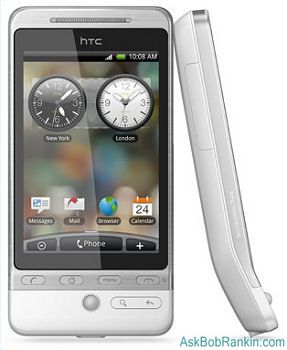
Android Phone HTC HeroSimply put, Android an operating system, like Windows or Mac OS. It's based upon the Linux operating system and it's designed specifically for mobile phones. Android was the only product of a company called Android, which was acquired by Google in 2005. Google was buying everything in sight back then, but the purchase of Android started an enormous rumor mill churning.
Technology pundits speculated that Google was going into the mobile phonebusiness. That would be a great day for mobile phone users because, as everyone knows, Google offers all of its products for free! The greedy, extortionate phone companies would face competition and the cost of cell phone service would plummet. Hurrah!
Well, that didn't happen. Google does not make a mobile phone or offer mobilephone service, and it doesn't plan to do so. At least they aren't telling anyone, if they do have such plans. Actually, it's very unlikely that making phone hardware and all the hassles of building or operating a phone service network would fit into Google's Software-as-a-Service (SaaS) business model. But just the thought of Google giving away free phones and service got the regular phone players to cooperate in Google's plan.

Android - What's In It For You?

That Android philosophy is to make it easy and free for software developers to write wildly cool applications that will run on any Android-based phone. The explosion of innovation and creativity will produce better products at lower prices, goes the theory. The benefits of Android-based phones include a much easier to navigate user interface than other operating systems; a relationship with developers that encourages a vast variety of applications instead of putting each one through a corporate profit-wringer (e.g. Apple's App Store) before releasing it to the public; and lower prices.
Another goal of the Android platform is to allow users to fully tailor the phone to their own interests. You can change the phone's homescreen, the style of the dialer, or use an alternate photo viewing application instead of the one that comes with the phone. And the Android Software Development Kit is meant to make it much easier for developers to write software for Android-based phones.
The first Android-powered phone to hit the market was the T-Mobile G1, which features Google Mobile apps such as Search, Gmail, Calendar, Maps, and YouTube. For what it's worth, friends of mine who have the G1 say that they love it. There's also a follow-up device, the MyTouch 3G. If you have an Android phone, you can download over 8000 free and paid applications such as games, productivity tools, and social networking apps at the Android Market.

Android Off To a Slow Start

So why isn't Android everywhere? To a certain degree, the philosophy has run afoul of the inherently greedy, monopolistic mobile phone industry. "By the end of 2009 there will be at least 18 phone models using Android worldwide, according to Google," says Wikipedia. Eighteen phones for an operating system that's been available for four years? Perhaps phone makers and the carriers are not thrilled about an operating system that they don't control completely, because that can limit profit potential.
Case in point: Verizon cripples many of the phones they offer, so they can sell additional services. There is no WiFi on Verizon's Blackberry phones, because they want to sell you an expensive data plan. On an Android platform, this couldn't happen because the operating system is open source software.
Some of the Android phone manufacturers are firms you've never heard of like General Mobile, HighScreen, and Huawei. Some are big phone makers like HTC (T-mobile), Motorola, Sony Ericsson, and Samsung. Dell and Lenovo are two computer makers who are developing phoning platforms for computers using Android. But if those big companies were 100% behind Android, you'd think there would be a lot more phones and you'd see a lot more Android TV commercials. Android has only 3 percent of the mobile phone market as of this writing. The iPhone, by comparison, has 14 percent.
One bright spot for Android is the announcement by Motorola that they will be focusing heavily on Android, hoping to stem the tide of slumping sales. Two new Android phones will be announced by Motorola on September 10th. Sprint also announced their first Android-based phone, the HTC Hero, would be available in October.
Supreme Court Takes On Business Method Patents 
By Maria Bruno-Britz
 Nov 9, 200911:19 AM ET

There will no doubt be a lot of eyes and ears open today and directed at the Supreme Court as the justices study whether business methods can in fact be patented—a topic of great important to the high tech and financial services industries, and something BS&T has covered in the past.
According to The Wall Street Journal, companies as diverse as Microsoft, Bank of America and retailer L.L. Bean have inundated the Supreme Court with advice on the topic. Whether it’s Amazon.com’s one-click checkout process or Priceline.com’s reverse auctions, the Supremes will set out to determine once and for all whether such modern business activities deserve patent protection. If they rule against this, they will have reversed a decision that had expanded protections to such processes for the last 20 years, said the Journal. To paraphrase one of the readers’ comments, it really comes down to deciphering when something leaves the realm of “idea” and actually becomes a “method.”
What’s at stake, one attorney told the Journal, are millions, if not billions of dollars in value if these business method patents are eliminated. Many technology and pharmaceutical companies are urging the Supreme Court to uphold the patent protections, saying not doing so would inappropriately link high-tech processes to more primitive physical technology.
But not all tech companies are in favor of expanding the business methods protection, according to the article. Some, like Google, Symantec and Transamerica, said that doing so could expose them to infringement lawsuits over, “the very mental processes and ideas that are the building blocks of innovation.”
The entire article can be found on the Journal’s website.
This will be a very important debate and is probably needed to finally clarify what can and cannot be patented. Still, it is hoped the Justices keep in mind that 21st century technology is very different from 19th and early 20th century technology. Not taking this factor into account would be shortsighted of the Court.