Google Public DNS
Google recently announced its Public DNS service, which provides an alternative Domain Name Service (DNS) for any user connected to the Internet. Read on to find out why using this service could speed up your web surfing and provide other benefits as well...
What is Google Public DNS?
 I wrote about OpenDNS, a service similar to Google Public
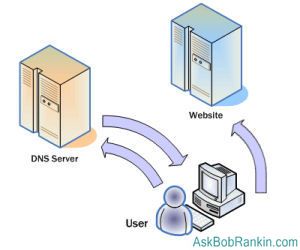
Every computer on the Internet is assigned a unique number called an IP address, which is registered to a more easily remembered domain name, such as AskBobRankin.com. To connect, your Web browser, email client, or other program must know the IP address. Translating a domain name such as www.askbobrankin.com into an IP address is the job of DNS nameservers. When you program needs to look up an IP address in a domain, it sends a request to a nameserver.
Authoritative nameservers are the final authority on which IP addresses belong to which domain names. There is a surprisingly small number of "authoritative" nameservers in the world. The one to which your program sends its lookup requests isn't one of the authoritative nameservers. Instead, it is a resolver nameserver that does nothing but handle lookup requests from users.
A resolver nameserver first checks its cache of things it's looked up recently to see if the answer to your request is in there. If not, it contacts one of the authoritative nameservers for the answer. It takes less time to deliver your answer from cache than to look it up in an authoritative nameserver.
Benefits of Using Google Public DNS
Google keeps more answers in its cache, and so lookups are faster overall. You can see how important fast DNS lookups are by viewing the source code of any Web page your browse. Typically, there will be more than a dozen URLs in a page, each of which requires a DNS lookup.
Google also provides more high-performance DNS servers distributed all over the world than most ISPs do. The faster the server and the closer it is to you geographically, the faster your Web surfing. So using Google Public DNS means your Web pages will load faster; that's the main benefit that users see.
Security of DNS servers is a big problem on the Internet, and Google has implemented a slew of features to protect users against malicious tampering with DNS results.
To replace your ISP's DNS service with Google Public DNS, you can change your computer's DNS settings manually. But there is a free utility for Windows users, the Google DNS Helper, that will do the job for you, even saving your old DNS settings so they can be easily restored if you wish.


 First, let's define some terms. DNS stands for "
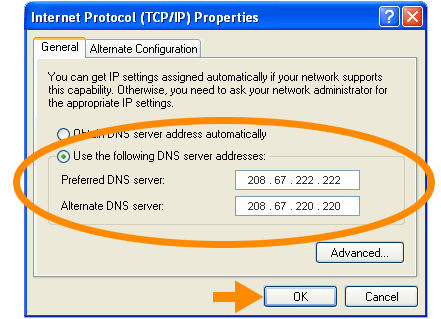 OpenDNS is totally free, and setting it up on an individual computer or a home network is easy. There's no
 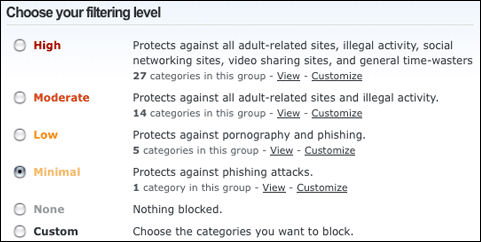 Parental controls are also offered by OpenDNS. What makes OpenDNS's parental controls special is that they offer so many different filtering choices. You can choose a filtering level of High, Moderate, Low, Minimal, None or choose Custom and then select the filtering categories that you want in effect. To create a filter all you have to do is check the box next to the filter category. Or if you like, you can filter specific sites that are off-limits for your kids. Parental Controls also requires an OpenDNS account.