Thursday, February 04, 2010

Nonprofits Make the List of Top Problems for the IRS—But Barely!


Nonprofits Make the List of Top Problems for the IRS—But Barely!

February 2010
Each year, the national taxpayer advocate submits an annual report to Congress listing the most serious problems encountered by taxpayers. This year's report, released December 31, 2009, and available on the IRS Web site, identifies, analyzes, and offers recommendations for resolving 21 problems, and only 1—listed as #20 out of the total of 21—is related to tax-exempt entities.

Issue Number 20—Research on Reaching Nonprofits

There is a clear recognition that the nonprofit sector is large and diverse, with citations of facts such as:
  • There is one exempt organization for every 169 Americans.
  • The sector employs about 9.4 million workers, representing over 7 percent of the total U.S. workforce.
  • There are 175 new tax-exempt organizations recognized by the IRS every day.
  • Higher education, hospitals, and primary care facilities, about 2 percent of the total number of public charities, hold more than half of the assets and represent well over half of all expenses.
  • Roughly half of all exempt organizations were staffed entirely by volunteers and another third had fewer than 10 employees.
But no matter the size of an organization, it must meet its tax-compliance and reporting obligations, whether or not it has staff or volunteers with the appropriate expertise. Even a volunteer who figures out the regular reporting obligations may be stumped by potential liability for excise taxes and accounting for unrelated business taxable income if the organization seeks to expand its funding sources. And the tenure of volunteers tends to be relatively short, so even if the knowledge is learned, the next volunteer needs to be educated.
The reality is that there are only nine employees in the Exempt Organizations Customer Education and Outreach (CE&O) division, and their daunting task is to meet the informational and educational needs of these nearly two million organizations. This staff represents less than 1.5 percent of the total number of IRS Exempt Organization employees.
So there are not very many people available to get the word out about such sweeping changes as the recent 990-N electronic postcard for small organizations and revisions in the Form 990. Although the IRS has done its best to leverage its limited resources (improved Web pages, regional workshops, collaborations with educational entities that train nonprofit professionals, etc.), it is a daunting task, and the national taxpayer advocate says that more resources are needed.
The discussion concludes with the recommendation for a research study to determine the best way to help educate nonprofits on their reporting responsibilities. Additionally, there is a focus on identifying collaborative partners to deliver the plan. Finally, and probably most important, it is hoped that such research can make a compelling argument for more funding for outreach, education, and perhaps even dedicated tax-exempt representatives in various geographic locations across the U.S.
So the national taxpayer advocate's position is for research that would inform the development of the best ways to inform the sector and document the need for more resources. It is now up to Congress and to the IRS to act on the recommendation. Again, note that this is the 20th on the list of 21 issues presented to Congress for action.

Other Issues Relevant to Nonprofits

Much of the report focuses on improving IRS assistance to all taxpayers on the telephone—in fact, the IRS's goal for 2010 is to answer 71 percent of the calls from taxpayers, down from 83 percent in FY 2007. This reduction means that the IRS doesn't plan to answer about 3 out of every 10 calls. Although the IRS responds that the problems are caused by lack of resources, this explanation does not appear to impress the national taxpayer advocate as a strategy for fixing the problem.
Other issues of interest to nonprofits include:
  • There is a concern with the poor advice and services being provided by some tax preparers. The current focus is on possible certification and licensing for those filing returns for individual taxpayers, but that could easily be expanded to those filing all kinds of returns, including Form 990.
  • There is a recommendation to remove the option to use an individual preparer's Social Security Number as an identifying number. This change would enable the IRS to get better data about the preparer population, identify trends and problem preparers, and target outreach and education more effectively.

Summary

The national taxpayer advocate's annual report to Congress sets the stage for discussion of IRS plans and strategies, but in a year dominated by health care reform and economic recovery strategies and 20 other issues on the list, making resources available for research on nonprofit sector needs seems unlikely. Although this recommendation could be viewed as a relatively low-cost issue where results could be delivered, more realistically, the sector should probably plan to continue its own outreach efforts to keep tax-exempt organizations informed on reporting responsibilities.

Wednesday, February 03, 2010

Volcker Pushes to Rein in Banking


Since Dr. Alan Greenspan allowed the Glass–Steagall Act to be revoked US Banks have had problems with their investments and have had to be 'Saved'  by TARP. Glass–Steagall Act is also known as part of the Banking Act of 1933 was a law that established the Federal Deposit Insurance Corporation(FDIC) in the United States and introduced banking reforms, some of which were designed to control speculation and prevent another Great Depression.Dr. Alan Greenspan had a long term policy of laissez-faire Free Market and that the Market would control itself. On his retirement he stated that this was an error and he, as FRB Chairman, should have paid more attention to controlling the Free Market Speculation and out right fraud that has brought the world to where it is NOW.I believe that this has proven that the Glass–Steagall Act was beneficial for over 70 years and should be encouraged for the rest of the world. 

Volcker Pushes to Rein in BankingPresidential adviser Paul Volcker told members of the Senate Banking Committee the U.S. public did not believe in rescuing speculative banks.February 02, 2010
WASHINGTON, Feb. 2 (UPI) -- Presidential adviser Paul Volcker told members of the Senate Banking Committee the U.S. public did not believe in rescuing speculative banks."There has been, and remains, a strong public interest in providing a safety net ... for commercial banks carrying out essential services. There is not, however, a similar rationale for public funds -- taxpayer funds -- protecting and supporting essentially proprietary and speculative activities," said Volcker, chairman of the president's Economic Recovery Advisory Board.
Activities "unrelated to customer needs" such as managing hedge funds, owning private equity funds or proprietary trading "should stand on their own," he said in a prepared statement.
Investment banks, meanwhile, "assumed the cloak of a banking license" to garner public support when the financial meltdown began to unfold in 2008.
"It is critically important that those institutions, its managers and its creditors do not assume a public rescue will be forthcoming in time of pressure," he added.
However, to ban commercial banks from proprietary lending, Volcker said there should first be international support for taking such a step.
Copyright 2009 by United Press International. All rights reserved.

Thursday, January 28, 2010

My organization will work smarter and greener


Techsoup.org, The place for nonprofits and libraries


New Year's Technology Resolutions — a Four-Part Series this is Part 4
My organization will work smarter and greener
Innovative telecom solutions are making it easier for organizations like yours to work in alignment with their social and environmental values. New technology from TechSoup can help your organization be more flexible, run more efficiently, reduce operating costs, and shrink your environmental footprint. It can also help you create more flexible and productive work experiences for your teams. And all of that adds up to a happier, greener, more successful nonprofit.
This TechSoup article
 is a great place to begin learning how unified communications systems are changing the way we work. You'll find an introductory overview of the ideas we highlight below and links to a helpful discussion between other nonprofits implementing these strategies.
Skip the Trip — Hold Meetings via the Phone or the Web
ReadyTalk
This online web and audio conferencing service lets nonprofits hold effective, productive meetings — even if participants are separated by thousands of miles. ReadyTalk can also be used to host and record webinars, presentations, and training tutorials with just a single click. A one-year subscription to ReadyTalk through TechSoup also lets users access reduced rates to additional services including recording hosting services, recording audio conferences, and web conferences with more than 15 participants.
GIPS PC Handset and Speaker Switch for VoIP
 (In TechSoup Limited)
If your organization is thinking about using a Voice-over-Internet-Protocol (VoIP) service, you should consider this telephone handset from Global IP Solutions. Similar in appearance to a traditional phone handset, the device's attached cable has to be inserted into a computer's microphone and earphone jacks for clear connections using VoIP technology. The included switch allows you to keep your speakers and handset connected to the same computer, and easily switch the audio output between the two as needed.
Out of Sight, Not out of Mind — Work and Collaborate While Away from the Office
Wikispaces
More and more nonprofits are using wikis — collaborative websites that allow users to create and edit content. Wikispaces has simplified the wiki experience so groups with any level of technical expertise can easily work together, share information and ideas, and work on projects in one central place, no matter where individual users are located.
MyFax
With MyFax, your staff can send and receive faxes via email. Nonprofits can use the service to save the expense and environmental foorprint of fax machines, paper, fax servers, and dedicated fax lines. MyFax makes it possible for staff to stay in contact whether they're in the office, the field, or telecommuting from home.
Symantec pcAnywhere 12.5
Symantec's pcAnywhere lets your staff stay productive while they work away from the office — even when they encounter technical problems. This powerful software gives your IT staff the ability to remotely manage and trouble-shoot your organization's computers and servers, so problems can be quickly diagnosed and corrected even if staff are working offsite.
Microsoft Groove 2007
Microsoft Groove 2007 lets teams work together and share information whether they're connected to a network or not. Work is done inside collaborative workspaces that put all team members, organizational tools, and information in one virtual place. Groove keeps everyone up to date automatically and efficiently by synchronizing changes as they're being made. It allows users to work anywhere, anytime, with anyone — even people outside their organization.
More Tips on Using Tech to Stay Green:
For more information, resources, and ideas about how to "telegreen" your organization, check out these articles about travel reduction
, telecommuting
, and online collaboration
.

Chrome Keyboard Shortcuts


chromeKB - Google Chrome News, Tips and Articles
Read About
Chrome Keyboard Shortcuts

Becoming familar with keyboard shortcuts helps save time and effort for everyday power users whilst providing an essential tool for people with dexterity and visual impairments.
Therefore in order to speed up your Chrome experience here is a list of the most commonly used shortcuts and a brief explanation of what they do.

Chrome Window/Tab Shortcuts

Ctrl+P - Print your current page
F5 - Reload current page
Esc - Stop page loading
Ctrl+F5 or Shift+F5 - Reload current page, ignoring cached content
Press Alt, and click a link - Download link
Ctrl+F - Open find-in-page box
Ctrl+G or F3 - Find next match for your input in the find-in-page box
Ctrl+Shift+G or Shift+F3 - Find previous match for your input in the find-in-page box
Ctrl+U - View source
Drag link to bookmarks bar - Bookmark the link
Ctrl+D - Bookmark your current webpage
Ctrl++ - Make text larger
Ctrl+- - Make text smaller
Ctrl+0 - Return to normal text size

Chrome Feature Shortcuts

Ctrl+B - Toggle bookmarks bar on and off
Ctrl+H - View the History page
Ctrl+J - View the Downloads page
Shift+Escape - View the Task manager

Chrome Webpage Shortcuts

Ctrl+N - Open a new window
Ctrl+Shift+N - Open a new window in incognito mode
Press Ctrl, and click a link - Open link in a new tab
Press Shift, and click a link - Open link in a new window
Alt+F4 - Close current window
Ctrl+T - Open a new tab
Ctrl+Shift+T - Reopen the last tab you've closed. Google Chrome remembers the last 10 tabs you've closed.
Drag link to tab - Open link in specified tab
Drag link to space between tabs - Open link in a new tab in the specified position on the tab strip
Ctrl+1 through Ctrl+8 - Switch to the tab at the specified position [+n] number.
Ctrl+9 - Switch to the last tab
Ctrl+Tab or Ctrl+PgDown - Switch to the next tab
Ctrl+Shift+Tab or Ctrl+PgUp - Switch to the previous tab
Ctrl+W or Ctrl+F4 - Close current tab or pop-up
Alt+Home - Open your homepage
Ctrl+O, then select file - Open a file from your computer in Google Chrome

Chrome Text Shortcuts

Ctrl+C (When text is highlighted) - Copy content to the clipboard
Ctrl+V or Shift+Insert - Pastes text from clipboard
Ctrl+Shift+V - Pastes text from clipboard (remove any formatting, pastes text only)
Ctrl+X or Shift+Delete - Cut content and copy to the clipboard (essentially deleting from the page)

Chrome Navigation Shortcuts

Backspace or Alt+left arrow - Go to the previous page as stored in the browsing history for that tab
Shift+Backspace or Alt+right arrow - Go to the next page as stored in the browsing history for that tab
Spacebar - Scroll down the page
Home - Move to the top of the page
End - Move to the bottom of the page

Monday, January 25, 2010

Cable Cutters: Cheap Alternatives to TV, DSL, and Cell Service


Cable Cutters: Cheap Alternatives to TV, DSL, and Cell Service

Thanks to a spate of agile new Web-based and wireless services, cutting ties with your service provider is easier than ever.

Zack Stern, PCWorld Jan 19, 2010 7:00 pm


I don't like service providers. Cable TV, landline phone and fax, mobile phone, ISP, and even satellite radio companies have so little real competition that they know they don't have to impress me very much to get my business. I either pay the full fees and become connected to them by their cord (physical or wireless), or I don't get any service. Until lately.
Now those companies face new pressure from Web-based technologies and services that can offer similar features for far less money, or even for free. Many of these services ride in on the cord owned by the big service provider, relegating said service provider to the job of operating "dumb pipes."
Which TV executive knew just a few years ago that paid and free online services could threaten cable companies? Ditto for the VoIP challenge to landline phones, online fax services replacing another cord,Internet radio being a better value than a satellite subscription, and more.
Here I'll explain the alternatives that can help you walk away from the biggest corded companies that we love to hate. You can pick and choose which are still worth keeping and which to toss. Are you being pressured into buying a service provider's "triple play"? Try three strikes and you're out.

Pay for TV and Movies Instead of Cable Service

Zune TV--click for full-size image.The cable--and satellite--TV model is on life support. Who wants to pay $100 or more a month for an endless well of unwatched shows? Even if you have an appetite for premium-channel shows, you can save money by buying some Ă  la carte and watching others free online.
Paid, per-show TV sources are all around you. Apple iTunes, Amazon VOD, Zune Marketplace, Blockbuster On Demand, and Jaman store thousands of shows and movies.
All offer various purchase and rental options, often $3 to $4 to rent a movie for a day. Expect to drop about $30 to $40 per season of scripted, premium-channel TV (HBO, Showtime, and such), or, often, about $10 less for network shows.
That sounds pricy at first, and it often costs more than buying a physical disc. But total up four or five of those seasons and a handful of movies, and you could pay half as much as cable over the same time period.
If you want to watch video on a portable device, stick with iTunes for iPod and iPhone compatibility; or Zune Marketplace for Zune support. Unfortunately, the other stores don't offer portable media player support. If you have an AppleTV or an Xbox 360, you can at least watch your shows in the living room.
Netflix is a good base service for any cable TV-free home. The cheapest subscription for the DVD-by-mail service is $8.99 each month, but much of the value comes in the thousands of shows and movies you can stream from Netflix to your PC. Plus, Netflix can stream to a TiVo, Xbox 360, PS3, dedicated Roku device, and other hardware, so you can watch in the living room without a media center PC.
Similar streaming services like Amazon, Blockbuster, Jaman, and others can play on much of the same hardware. Check your TV-connected hardware against these services' support pages.
I've also got my eye on the upcoming Boxee Box andSezmi service; both will offer hardware that plays Internet-streamed video on a TV. Sezmi, which will be rolling out nationwide this year, even promises local shows and live sports, one of the biggest deficits in online libraries.

Get Free TV And Movies

Crackle TV service--click for full-size image.Hulu is still my king of free TV sites, although it's uncertain if it will--orwon't--change to a paid model. And I've been occasionally frustrated when show episodes or seasons disappear just before I try to watch. But the majority of recent network shows are available. Plus, you'll find movie and TV favorites alongside B-level misses.
As I write this, you can watch "Spartacus" and "All the King's Men" alongside the Norm MacDonald vehicle,"Dirty Work."
Check Hulu first, but also scan other sites for free TV and movies. Crackle, Comcast Fancast, and even YouTube have movies and TV content. If you you're looking for a specific show that you still can't find online, visit its Web site or its network site directly.
Live sports can still be elusive. Check the network that's broadcasting the content for a stream; I saw a Monday Night Football game this way last fall. MLB.com hosts live baseball, but you'll have to pay for service. Justin.tvcould be your best ace for any sport. While unsanctioned, many users play live streams of their local stations; just click the sports button.
And remember the cheapest, highest-quality TV source of all: an antenna. Over-the-air HD content looks great, often better than video compressed for a cable TV feed. You'll just need a TV with an HD tuner--typical for most sets built in the last several years--or a PC TV tuner.

Cut Landline Phone And Fax Service

RingCentral--click for full-size image.If you have a reliable ISP, a voice over IP (VoIP) phone company can replace a traditional landline. You can place calls through a PC, but you'll have a better experience on a dedicated VoIP handset. The device connects to your network over Wi-Fi or wired ethernet to route calls.
Skype deserves its VoIP ubiquity. You'll make free calls to other members or pay about 2 cents per minute to dial out to a real phone. Traditional phones can also call in to you. But several alternatives challenge the Skype giant.
I like the features and versatility of RingCentral. Depending on the package you buy, you'll get a local phone number for incoming calls, an incoming toll-free number, and an incoming fax line. Call-routing functions make RingCentral excel. Like Google Voice ormy1voice, RingCentral can send incoming numbers to any phone. You can have it ring your VoIP handset, a mobile line, a hotel room, a temporary office, or anywhere you happen to be. Or you can have it go straight to voice-mail during off hours, if you don't want to be reached.
Most RingCentral plans bundle fax service, or you can just pick that for about $8/month. You'll send and receive faxes through e-mail, and cut the cost of a dedicated, traditional fax line. Many other companies sell fax service, too. Check out Mbox, eFax, and MyFaxfor several options, all priced in a similar range.

Free Yourself From Wireless Phone Service

Fring.com--click for full-size image.If you like your current handset or smartphone, you might not be able to change wireless providers. Your device is almost certainly locked to your carrier, and worse, there's a chance that differing network technologies mean you can't move your phone to a different network even if it's unlocked.
AT&T and T-Mobile rely on GSM networks; Sprint uses CDMA; and most Verizon handsets use CDMA, but Verizon also offers some dual-mode devices that support both network types. An unlocked iPhone is still single-mode, so it will never work on a Sprint network, for example. Ask a carrier you're considering how they can enable your old phone.
For GSM devices, including Apple's iPhone, your best option could be unlocking the handset, then swapping in a GSM SIM (subscriber identity module) card from the new provider. Even a prepaid card can work, which drains your account only when you use service.
If you want to completely cut wireless phone service, you could try hopping between Wi-Fi hotspots while using a VoIP app. Truphone and Fring work on Android devices, BlackBerrys, iPhones, and even iPod touch media players. (You'll need a headset microphone for any of the players.) It's not the same as real wireless phone service, but it might be enough for some users in some situations.
You can beat text messaging fees by sending texts through an instant messenger app or in e-mail. And instead of paying for your carrier's voice-mail transcription service, you can substitute SpinVox,PhoneTag, YouMail, or Google Voice.

Revise Your Internet Service

Look for a network without a lock icon to try to gain access.
inSSIDer--click for full-size image.Did you shop around for your ISP? You might not be getting the best price or service. Check outBroadband Reports for customer reviews. You could find a locally grown alternative to the faceless corporation that you currently use.
You might be able to completely break free from home, wired Internet service. First, walk around your houserunning inSSIDer. Try to reach a friendly neighbor or café. Or if a neighbor's signal is locked, ask around, and offer to pay part of the fee to join the network and share service.
Wi-Fi service subscriptions from T-Mobile, Boingo, and others can pay off if you frequent airports and other locations with their coverage. But you're almost as likely to find an open, free network. (To be fair, however, if you need an always-on connection wherever you are, nothing beats an EvDO modem stick from Sprint or Verizon.)
Several Web sites map Wi-Fi networks, and are good places to check out before you hit the road. Try Jwire,WeFi, and Hotspotr.
If you require an always-on connection, you might be better off buying short- or long-term service from Sprint or Verizon. You can buy a USB plug that connects a single laptop, or a home desktop for that matter. Many mobile phones can also be tethered to a laptop as part of your service plan, sharing the wireless Internet feed. Or opt for a portable router such as the MiFi, and it'll turn its mobile connection into a Wi-Fi, Internet bubble. The router will work in your car and could be cheaper than a hotel's Internet service.

Break Out of Satellite Radio's Orbit

Pandora radio--click for full-size image.Monthly satellite radio service might not be worth what you pay. If your favorite talk show is in an exclusive contract, you could be stuck, but music listeners have alternatives. TryPandora, Last.fm, andSlacker from a PC or even a smartphone.
Last.fm is free, and the others offer both paid and free versions. All build music programming based on your preferences. If you indicate that you don't like a certain song or musician, they'll adjust your playlist to better match your tastes.
The mobile versions of these services are an especially exciting proposition. They offer the possibility of replacing traditional car radio by streaming music wirelessly to your smartphone in the car. This, of course, is highly dependent on the 3G wireless coverage you're getting as you drive, but that coverage is getting broader and faster all the time. Additionally, Slacker can cache stations to your device so you can play music without any Internet connection. This helps when you're driving across no-coverage zones.

Get a Discount, or Cut Ties

Sometimes you just can't cut the cord. In spite of poor service and price gouging, you might need some of these services. For one last alternative, try calling up and asking for a discount. It's worked for me, especially with TV and Internet service.
Arm yourself with details on your current companies' introductory deals and competitors' rates, and ask for a break. If you don't get a good answer, call back, and ask someone else.
Even if you only cut one of these services, you could save a lot. Pay for what you want--and only what you use--to take back control of your subscriptions.

Thursday, January 21, 2010

It's Time to Unite Money Laundering and Fraud Prevention Efforts

It's Time to Unite Money Laundering and Fraud Prevention EffortsJan 21, 201002:03 PM ET
By Karen Van Ness, Oracle Financial Services Software
In the last year, the financial services industry received a rousing reminder of the profound damage that increasingly complex financial schemes and fraud can inflict on their reputation and bottom line. Analysts estimate that financial crime costs industry organizations approximately $20 billion in losses, annually. At the same time, banks are grappling with expanding anti-money laundering (AML), fraud prevention and risk management regulatory requirements, and spiraling compliance costs associated with those initiatives. In this environment, many organizations are reevaluating their compliance and fraud prevention programs and increasingly pursuing an integrated approach to achieve the operational and cost efficiencies critical to maintaining profitability.
By consolidating AML compliance and fraud prevention efforts, financial institutions stand to gain a vital holistic view of enterprise data across lines of business, channels and products, resulting in a better understanding of the full impact of financial crime on the institution, as well as improved return on investment for risk and compliance initiatives. For example, by improving coordination between compliance and fraud analytical teams, organizations can leverage strategic operational synergies to gain cost savings and efficiencies for transaction monitoring programs. From a customer management perspective, an integrated approach to AML compliance and fraud prevention can support customer retention in an era in which it is most vital. Security and trust remain paramount in the minds of the today’s consumer, so a reputation for strong compliance, security and risk management can go a long way toward cultivating customer trust and confidence, which, in turn, bolsters client retention.
Centralizing AML and fraud prevention also enables financial institutions to expand reporting capabilities to increase the efficiency and accuracy of monitoring efforts. A consolidated approach can help to cut the number of defensive filings of suspicious activity reports (SAR’s) and yield higher quality reports for law enforcements.
While these benefits are attractive, many banks face hurdles – primarily related to their legacy IT and organizational structures – that prevent them from capitalizing on the potential benefits of a consolidated approach. Historically, many financial institutions have installed point solutions for AML and fraud prevention supported by siloed data marts, with limited data visibility across teams. Also, in many institutions, the AML compliance and fraud mitigation teams are separate entities that each develop, maintain and leverage their own watch lists. Collaboration across these teams generally occurs on an ad-hoc basis, with each department sharing information across teams infrequently and informally. To begin the process of breaking down silos, organizations must first make a commitment to, at the very least, improving and establishing ongoing, formalized communication across AML and fraud prevention teams.
Organizations can then begin to address the IT infrastructure issues, starting with the creation of a single, common data repository for AML and fraud-related information. There is a high correlation of data used for both AML compliance and fraud prevention efforts. Both programs often consider the same products, transaction types and channels as high-risk items that require close monitoring. A consolidated approach enables organizations to easily acess a more unified view of fraud and AML risks and eliminates duplicate monitoring efforts for high-risk elements.
Financial institutions can further increase operational efficiency by re-using scenarios and detection models for both AML compliance and fraud detection, as AML scenarios may also be indicative of fraudulent behaviors, and vice versa. Organizations can repurpose AML scenarios for fraud detection by adding fraud-specific parameters for detection and risk scoring to leverage common data requirements and reduce the costs and time previously spent to on-board new scenarios. A consolidated approach also enables financial institutions to intelligently and quickly aggregate and correlate related entities and alerts. By centralizing data access, organizations have the power to generate more targeted and actionable fraud and AML alerts, as well as manage and investigate alerts and cases in a more efficient manner.
By taking these steps, institutions will also benefit from more flexible workflows to facilitate easier hand off of alerts, cases and investigations, as well as greater sharing of leads and information between AML and fraud teams. A centralized monitoring approach also supports load balancing across teams to meet changing business and regulatory needs and mitigate the risk of inadequate coverage.
Banks that approach AML compliance and fraud mitigation operations in tandem can rapidly realize the benefits of a consolidated approach. For example, a leading U.S financial institution recently implemented a centralized case management solution that enabled its AML and fraud departments to share information across a single system. After its initial deployment, the institution quickly realized increased efficiencies in its AML and fraud prevention operations by minimizing the workload associated with alert notifications, decreasing alert decisioning time and reducing duplicate case activities. The centralized system also enabled the bank to take a more holistic approach to its client relationships by providing its AML and fraud departments with access to the full history for each customer, and improved collaboration across the AML and fraud teams by facilitating discussion of common information within the system. The bank plans to extend the value of its investment by leveraging the case system to enable pattern detection and link analysis that will help the bank’s fraud team identify new types of risk and strengthen its overall efforts to combat financial crime.
In the coming year, financial institutions will almost certainly continue to face a host of new AML and fraud threats as well as new levels of regulatory complexity. An integrated approach to financial crime and compliance management will empower institutions with the visibility and flexibility they need to efficiently mitigate known and emerging criminal threats and support critical efforts to ensure public trust and confidence.
Karen Van Ness is senior manager for product management at Oracle Mantas, part of Oracle Financial Services Software. She has 20 years of experience in the information technology and financial services industries. At Mantas, she has helped bring to market Mantas solutions targeted at AML and fraud, and supported implementations at top-tier banking and brokerage firms in the US and internationally

Thursday, January 14, 2010

Google Public DNS from Ask Bob Rankin


Google Public DNS


Google recently announced its Public DNS service, which provides an alternative Domain Name Service (DNS) for any user connected to the Internet. Read on to find out why using this service could speed up your web surfing and provide other benefits as well...

What is Google Public DNS?

Google Public DNSI wrote about OpenDNS, a service similar to Google Public DNS, back in April 2009; you can read it for some background on DNS in general and why a public DNS service may improve your Web surfing and other Internet experiences. This article talks about how to use Google Public DNS and how it compares to other public DNS services. First, a short review of how DNS works.
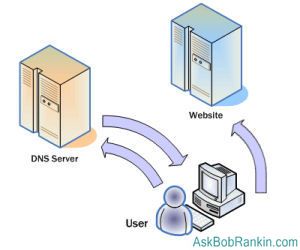
Every computer on the Internet is assigned a unique number called an IP address, which is registered to a more easily remembered domain name, such as AskBobRankin.com. To connect, your Web browser, email client, or other program must know the IP address. Translating a domain name such as www.askbobrankin.com into an IP address is the job of DNS nameservers. When you program needs to look up an IP address in a domain, it sends a request to a nameserver.
Authoritative nameservers are the final authority on which IP addresses belong to which domain names. There is a surprisingly small number of "authoritative" nameservers in the world. The one to which your program sends its lookup requests isn't one of the authoritative nameservers. Instead, it is a resolver nameserver that does nothing but handle lookup requests from users.
A resolver nameserver first checks its cache of things it's looked up recently to see if the answer to your request is in there. If not, it contacts one of the authoritative nameservers for the answer. It takes less time to deliver your answer from cache than to look it up in an authoritative nameserver.

Benefits of Using Google Public DNS

Google keeps more answers in its cache, and so lookups are faster overall. You can see how important fast DNS lookups are by viewing the source code of any Web page your browse. Typically, there will be more than a dozen URLs in a page, each of which requires a DNS lookup.
Google also provides more high-performance DNS servers distributed all over the world than most ISPs do. The faster the server and the closer it is to you geographically, the faster your Web surfing. So using Google Public DNS means your Web pages will load faster; that's the main benefit that users see.
Security of DNS servers is a big problem on the Internet, and Google has implemented a slew of features to protect users against malicious tampering with DNS results.
To replace your ISP's DNS service with Google Public DNS, you can change your computer's DNS settings manually. But there is a free utility for Windowsusers, the Google DNS Helper, that will do the job for you, even saving your old DNS settings so they can be easily restored if you wish.